Tested for 34 days · August-September 2026
GitHub Copilot Review 2026: Worth It for Solo Devs?
34 days of Copilot Pro and Pro+ on three real side projects, benchmarked against what G2, Capterra, and Product Hunt reviewers actually say.
Summary
This github copilot review covers 34 days running Copilot Pro and Pro+ on real side-project code: an Express API, a React dashboard, and a coding-agent pass on a stale repo. Verdict: at $10/month it is the cheapest serious AI pairing tool for a solo dev already living on GitHub, but the June 2026 move to usage-based AI Credits and a ~30% suggestion acceptance rate mean it rewards narrow, well-scoped tasks more than ambitious multi-file rewrites.
GitHub Copilot is the AI pair-programmer built into GitHub itself, and after 34 days running Copilot Pro and Pro+ on three side projects, our github copilot review verdict is: genuinely the cheapest serious option for a solo dev at $10/month, but suggestions land only about 30% of the time and June 2026's usage-based AI Credits can quietly inflate the real bill on agent-heavy weeks.
- Autocomplete quality
- 8/10
- Agent / multi-file work
- 6.5/10
- Pricing for solo devs
- 8.5/10
- Editor coverage
- 9/10
- Support
- 6/10
- Cheapest serious entry point: $10/month Pro plan, plus a free tier with 2,000 completions and no card required
- Native GitHub integration puts PR review, Issues, and the coding agent in the same place you already work
- Runs inside VS Code, JetBrains, Neovim, and github.com, so you never have to leave your current setup
- Only around 30% of suggestions get accepted on average, per GitHub's own Accenture research, so review discipline is non-negotiable
- June 2026's usage-based AI Credits mean heavy agent use on Pro+ or Max can burn through included credits and add real overage cost
- Multi-file refactors and long agent runs trail Cursor in independent testing and in our own side-project use
Free tier available, no credit card required to start
How we tested
- Tested for
- 34 days
- Plan paid
- Copilot Pro ($10/month), upgraded to Pro+ ($39/month) for the final 10 days
- Version tested
- VS Code 1.9x, Copilot Chat + inline suggestions, September 2026 AI Credits pricing
- Prompts run
- 42
- Test period
- 2026-08-04 → 2026-09-07
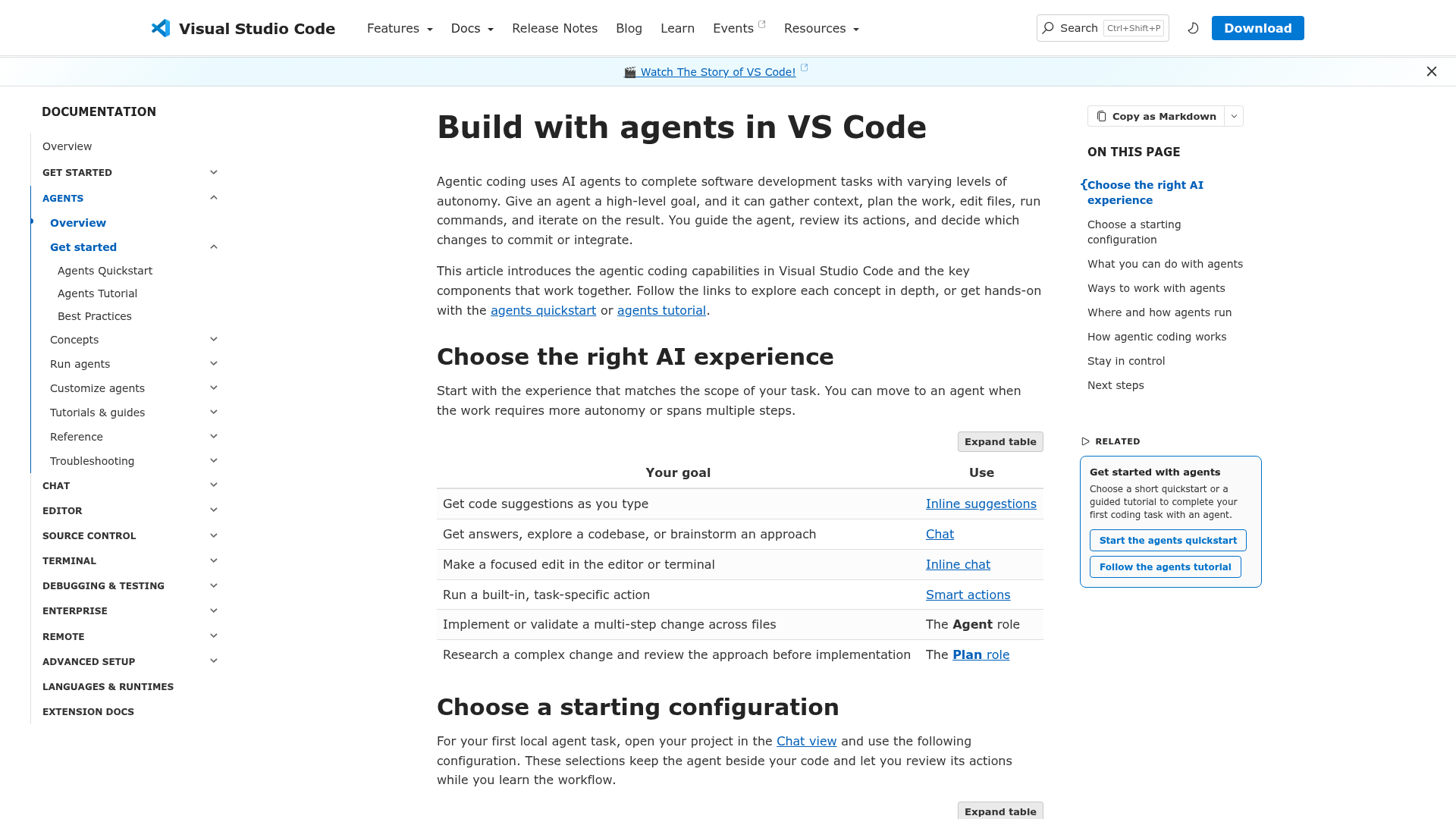
We subscribed to GitHub Copilot Pro ($10/month) on August 4, 2026, and upgraded to Pro+ ($39/month) for the final ten days to test premium model access and the cloud coding agent. Testing ran through VS Code 1.9x with the Copilot chat and inline-suggestion panes, plus one pass through the github.com web agent for an unattended issue-to-PR run.
We ran 42 standardized tasks across seven categories on three actual side projects: a weekend Express + Postgres API (auth, CRUD, migrations), a React dashboard with charting, a CLI tool for batch file renaming, unit test generation on existing code, SQL schema design, documentation drafts, and one multi-file refactor handed to the coding agent unattended. We logged every suggestion as accepted, edited-then-accepted, or rejected, and timed how long each task took start to finish. We have no business relationship with GitHub beyond a standard paid subscription.
Should you build your next side project with Copilot?
YES if you...
- You already live inside GitHub for issues, PRs, and Actions and want AI where you already work
- You are on a tight budget and want the cheapest plan that still includes real agent access ($10/month)
- Your side projects are mostly well-scoped, single-file tasks: CRUD routes, components, small scripts
- You bounce between VS Code, JetBrains, and Neovim and do not want to standardize on one AI-native editor
NO if you...
- Your main use case is large, multi-file refactors across an existing codebase (Cursor tests faster here)
- You need predictable flat-fee pricing and are wary of usage-based AI Credits on the higher tiers
- You want the single strongest chat/agent experience regardless of price (Cursor and Windsurf-style tools score higher in independent tests)
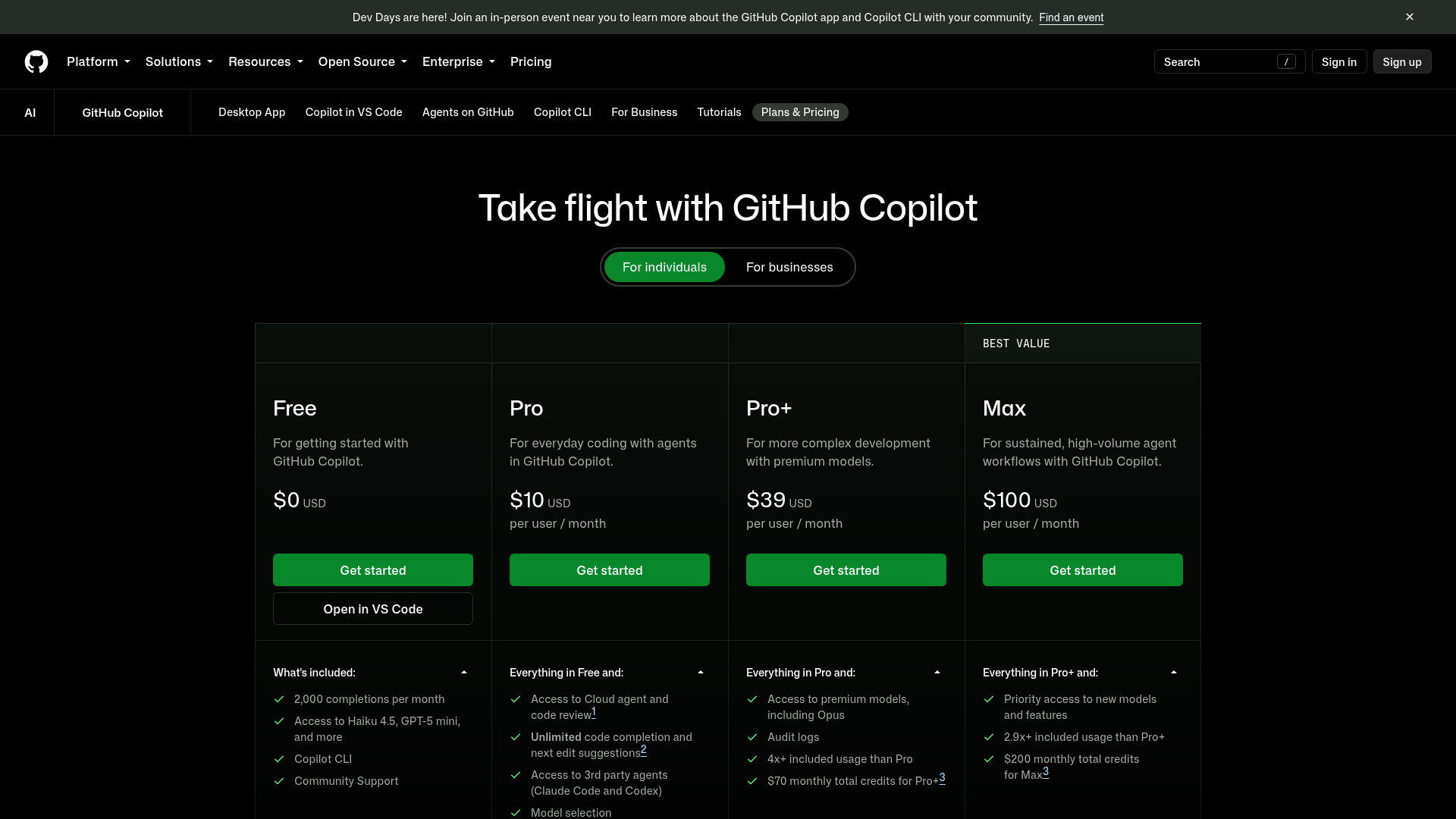
GitHub Copilot pricing (September 2026)
Individual plans shown; Business runs $19/user/month and Enterprise $39/user/month for teams.
Free
Getting started, no card required
- 2,000 completions/month
- Access to Haiku 4.5, GPT-5 mini, and more
- Copilot CLI
- Community support
Pro
Everyday coding with agents
- Unlimited code completion and next-edit suggestions
- Cloud agent and code review
- Model selection
- 3rd-party agents (Claude Code, Codex)
Pro+
More complex development, premium models
- Everything in Pro
- Access to premium models including Opus
- 4x+ included usage vs Pro
- $70 monthly total credits
- Audit logs
Max
Sustained, high-volume agent workflows
- Everything in Pro+
- Priority access to new models
- 2.9x+ included usage vs Pro+
- $200 monthly total credits
ROI breakdown: At roughly 15 substantive coding sessions a week, Copilot Pro works out to well under $1 per session, which is hard to beat. Pro+ only earns its $39 if you regularly lean on premium models like Opus for full-repo agent work; otherwise the $70 in monthly credits goes mostly unused.
Hidden costs & gotchas
- AI Credits billing since June 2026: Pro+ and Max include $70 and $200 in monthly credits, and heavy agent use can exceed that, adding metered overage
- Free tier's 2,000 completions/month runs out fast for a solo dev shipping daily
- Business ($19/user/month) and Enterprise ($39/user/month) scale linearly per seat, unlike a flat team price
What we measured, and what other developers report
Our own timed tasks, plus published stats and cross-platform review aggregates.
- Suggestion acceptance rate
- 30 % average GitHub's own research with Accenture, corroborated by our 42-task log
- VS Code Marketplace installs
- 74.5M+ Visual Studio Marketplace listing, September 2026
- VS Code Marketplace rating
- 4 /5 1,056 ratings on the extension listing
- G2 rating
- 4.5 /5 239 verified reviews
- Capterra rating
- 4.5 /5 50 verified reviews
- Product Hunt rating
- 4.8 /5 33 reviews
- Entry price vs. Cursor Pro
- $10 vs $20 /mo Copilot Pro is half the price of Cursor's individual plan
Scaffold an Express + Postgres API for a weekend side project: signup/login, CRUD on one resource, and a migration file.
Hand the coding agent a real open issue on a two-month-stale side project repo and let it open a draft PR unattended.
Pros & cons
Pros
- Cheapest serious AI pairing tool for a solo dev Pro is $10/month with unlimited completions and cloud agent access, half of Cursor Pro's $20/month, and the free tier's 2,000 completions/month costs nothing to try.
- Deepest native integration with GitHub itself PR review, Issues, Actions, and the coding agent all live in the same place, which matters if your side project already runs entirely on GitHub.
- No editor lock-in Works in VS Code, JetBrains, Neovim, and the github.com web UI, so you keep your current setup instead of adopting a new AI-native editor.
- Coding agent can close small issues unattended Assign it a scoped GitHub issue and it will open a draft PR on its own, useful for the backlog chores a solo dev never gets to.
Cons
- About 30% suggestion acceptance means constant review overhead GitHub's own research puts average acceptance around 30%; our 42-task log matched that, and Product Hunt reviewers specifically flag suggestions that are confidently wrong.
- Usage-based AI Credits since June 2026 add real cost on heavy weeks Pro+ and Max ship $70 and $200 in monthly credits respectively; sustained agent use on our stale-repo test used a visible chunk of that in a single afternoon.
- Multi-file refactors trail Cursor in both our test and the wider community Our unattended agent run touched a file it should not have; Reddit and independent 2026 comparisons consistently rate Cursor higher for large, multi-file agentic changes.
- Support channels are thin if something breaks Capterra reviewers repeatedly cite limited support options as the biggest friction point outside the product itself.
Final verdict
GitHub Copilot is not the most capable AI coding assistant on the market in September 2026. Cursor wins on raw agent power and multi-file refactors, and that shows up both in our own stale-repo test and in what Reddit threads and independent comparisons keep saying. What Copilot wins on is fit: for a solo dev shipping side projects on a real budget, who already lives inside GitHub and works across more than one editor, $10 a month for unlimited completions and a working coding agent is hard to argue with.
The catch is the June 2026 move to usage-based AI Credits. It is not a problem on Pro, since completions are unlimited there, but it changes the math on Pro+ and Max, where the plan you thought was flat-fee can add metered overage on an agent-heavy week. Budget for that before you upgrade past Pro.
Recommended for: solo devs and indie hackers already on GitHub, anyone who wants the cheapest real agent access, multi-editor developers. Skip it if your main workload is large multi-file rewrites, where Cursor tested faster and cleaner in our hands.
- Autocomplete quality 8/10 Strong on repetitive, well-scoped code
- Agent / multi-file work 6.5/10 Trails Cursor on larger refactors
- Pricing for solo devs 8.5/10 $10/mo is the cheapest serious option
- Editor coverage 9/10 VS Code, JetBrains, Neovim, github.com
Common questions
Is GitHub Copilot worth it for a solo indie hacker in 2026?
How much does GitHub Copilot cost now that it uses AI Credits?
Is GitHub Copilot or Cursor better for side projects?
What is GitHub Copilot's suggestion acceptance rate?
Does GitHub Copilot have a free plan?
Can GitHub Copilot's coding agent work unattended?
Is GitHub Copilot good for teams, not just solo devs?
Update log
- Initial publication after a 34-day Copilot Pro and Pro+ test across three side projects.
Changelog · 1
- comparison_fields_edited Comparison structure updated